
How to do simple videos for your business
Video can be a terrific small business communication tool. It is best for sending visual information, building a relationship with the viewers, and yet most entrepreneurs don’t take advantage of it. You’ve asked me how I do simple videos, so here’s my tips.
Camera
I don’t have a fancy video camera. I do have a terrific older Olympus C-765 still camera with a movie mode. Any camera with a movie feature will work.
Preparation
Prepare your outline or script before you start. The more you prepare, the better you’ll do. For easy editing later, stick to one or just a few different shots. I usually start with an idea, work it out in my head, and rehearse a few times before taping. Also, go take a look in the mirror. You may need a bit of personal preparation to look your best.
Pick the Right Spot
Start by getting into great light. Natural light works very well. In my store, I like to get by the big windows for some bright and even lighting. Turn on all your lights, and bring in some extra lamps.
Pay attention to your background. Look for a relatively uncluttered background, and make sure you don’t have a lamp or plant that appears to grow out of your head. You can check easily by snapping a sample photo first.
Tripod or Handheld
Either way, stay about an arm’s length from the camera. That will give you better sound from the built in mic. Not great sound, mind you, but better sound.
If you have a tripod, use it! No tripod? Improvise! Set the camera up on a bookshelf, or stack up something flat for it to rest on. You can just hold the camera in one hand, at arm’s length. It’s hard to be steady that way, but it works OK for impromptu filming.
Film It
Make sure the camera is on movie mode and sound is turned on. Press the shutter button to start, pause just a moment then begin. You want to pause to make sure the camera starts filming and then to give yourself a bit of extra space when you edit.
Feel free to record two or three different times. In fact, it’s digital, so feel free to retry as many times as you want. And pause a few seconds after you finish before you trip the shutter again.
Copy It
Now hook up your camera and copy the movie file or files to your computer. My Olympus makes .MOV files and I use Windows Movie Maker, so I need to convert the files to edit them. I use MP4Cam2AVI to do the conversions. It’s very simple.
Edit It
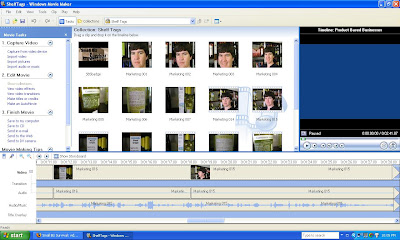 The best way to learn to edit, for me, was to practice some editing. Simple one shot films are easier than multi-scene pieces. Even cutting to a close up takes a bit of finesse to keep the audio correctly in sync. Trust me, though. If I can figure it out, so can you! Start simple, and learn as you go.
Post It
I use Blip.tv, and I have had good luck. I had trouble with sound quality on Google and You Tube. Blip was easy to use. If you’ll tell them about your blog, they’ll automatically cross-post for you. Otherwise, they’ll let you have a simple HTML code to copy and paste to your blog.
So, go try it! Make a video, and share a link with us!
New to SmallBizSurvival.com? Take the Guided Tour. Like what you see? Get our updates.
- About the Author
- Latest by this Author

Becky started Small Biz Survival in 2006 to share rural business and community building stories and ideas with other small town business people. She and her husband have a small cattle ranch and are lifelong entrepreneurs. Becky is an international speaker on small business and rural topics.




Hey – since you’re a YouTuber, you might want to check this out… There’s a video company that’s recruitingYouTubers and if they like your stuff, (and they should) they will actually pay you when your video gets a hit.Here’s their ink…www.flownetworkproductions.com/videorevenue.htm. It’s about time the people who makethe videos get some of the money instead of it all going to YouTube!
Thanks for your willingness to share, BJ. But, you might have noticed that I said I don’t use YouTube.
Becky! This is a great resource and one I can share over and over. Will start giving Blip a try.
I sure appreciate you!
Mike, thank you for such very kind words! I’m glad you found value.
The most important thing about video is to get started, get in there and do it.
You and I should brainstorm a list of 27 ways small businesses can use video!
For another video setup, read how Chris Brogan does it.